
Reward your future customers with a game
When a potential customer sends you an email, it’s always a good practice to provide a tangible feedback (basically a confirmation message) that informs them about the next steps: when they can expect an answer from you, who they will be in touch with, what they can do to prepare their meeting with you?
By doing so, you let your future customer know that you’re a caring company that adresses their slightest concerns!
You anticipate their questions and give them a clear roadmap.
But… what if there is no much more to give than a “thank you, we’ll get back to you soon” message?
Well, we thought…who doesn’t like bunnies (Answer: Sociopaths) ? And who doesn’t like ice-skating (Answer: Quite a lot of people actually… but bear with us).
We had our idea: Why not rewarding our visitors with the cutest bunny ice skating game ever?
Right after sending us a contact form, they would spend hours (days, weeks,…) trying to feed a hungry bunny and make it jump all around the page.
Well…that’s precisely what we did on our “thank you for contacting us” page.
Less is more
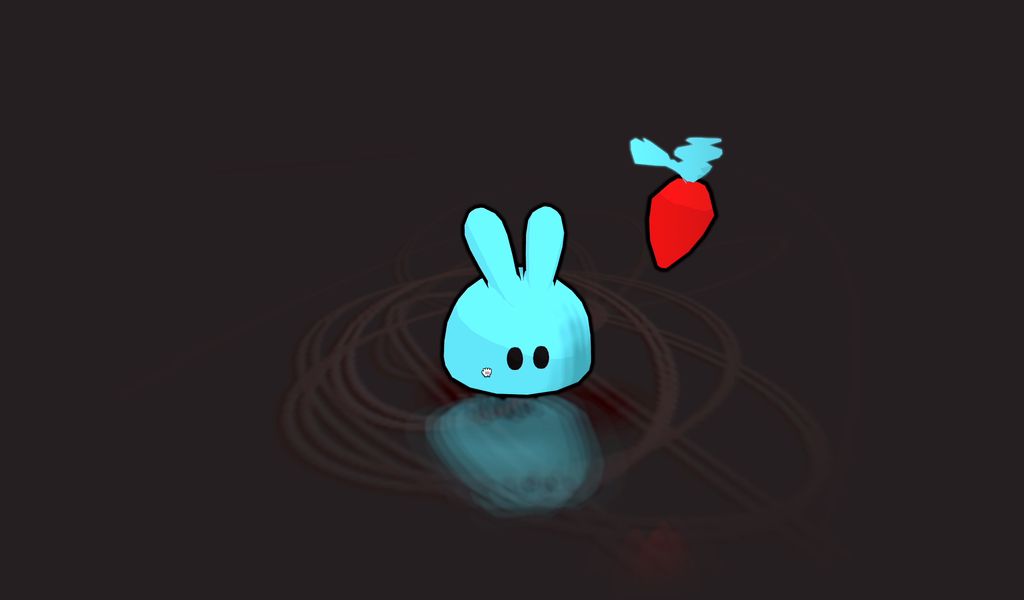
The whole game had to be light, fast, addictive and fun. So we wanted the character design to be very simple:
- A few primitive shapes stacked one onto another to make them look more or less like (cute) bunny you would want to pet.
- Colors as flat as the ice the bunny would be skating on (blue, white, red).
The gameplay had be the as simple as the design.
We figured that moving the mouse & clicking were the maximal behaviour we could hope from a random user that didn’t ask to play a game in the first place.
Mechanics of the game
So, you’re a renown rabbit tamer (kind of like crocodile dundee and alligators…or like Chris Pratt and velociraptors…but just with fluffy rabbits), using your mouse or your finger to act on the radial speed, direction and amplitude of your bunny-character.
Your bunny is a hardcore ice-skater. That’s all he likes and that’s all he does.
Every now an then, an incredible event happens: A juicy, orange, crunchy carrot pops out of the ice! As the caring pet-sitter you are, you reward your bunny for his ice-skating skills and help him to the smoothest path towards his lunch.
To help him catch the carrot you may also have to make him jump by clicking or tapping on the screen.
We’re not gonna lie: that’s the end of the concept!
But we swear, you will enjoy watching your little friend make spectacular skating figures in the air just to grab yet another carrot (he just can’t get enough).
Technical challenges
Though the game is probably one of the simplest in the world, it quickly proved to be very addictive thanks to its surprising player controls, its ability to draw scratches on the floor and its deadly simple aesthetics.
The bunjy-jumping effect
That’s the core feature of the game and what makes it so satisfying to play.
By moving the mouse, the user gives momentum, speed and a direction to the rabbit. Almost like the rabbit is bound to your mouse pointer by a very stretchable rubber band. This is a very simple demo of the effect :
See the Pen
Elastic player control by Karim Maaloul (@Yakudoo)
on CodePen.
This happens thanks to a very complex magic formula that in human words would translate as follows:
- Calculate the distance that separates the rabbit from your finger (or mouse cursor) ;
- Set the acceleration of the rabbit as a fraction of that distance ;
- Add this acceleration to the current speed of the rabbit ;
- Apply a small resistance to the speed ;
- Add the new speed to the current position of the rabbit ;
// Calculate the distance to the mouse
let distanceX = this.targetHeroAbsMousePos.x - this.hero.position.x;
let distanceY = this.targetHeroAbsMousePos.y - this.hero.position.z;

// Set the acceleration to a fraction of that distance
let accelerationX = distanceX * this.deltaTime * 0.5;
let accelerationY = distanceY * this.deltaTime * 0.5;

// Increase the speed by that acceleration
speed.x += accelerationX;
speed.y += accelerationY;

// Apply a small resistance
speed.x *= Math.pow(this.deltaTime, 0.005);
speed.y *= Math.pow(this.deltaTime, 0.005);

// Update the position of the character
this.hero.position.x += speed.x;
this.hero.position.z += speed.y;
That’s it… now at any given moment, the rabbit is accelerating towards your finger, which sometimes makes him exceed the target position and progressively reverse his direction. He ends up drawing circles on the floor until he reaches your finger’s position, begging for cuddles & scratches.
Talking about drawing circles
The game is made using Three.js, a WebGL library that makes it very easy to create 3D games & experiences.
But for a few specific visual effects, we sometimes need to deep dive into shaders, which are extremely fast and efficient programs. Unfortunately, as impressive they are when it comes to calculate graphic effects, these guys are completely unreliable when it comes to keeping track of the progress of a drawing they just made.
Shaders literally have no memory.
That became an issue as we definitely wanted to display the leftover skating marks on the floor where the rabbit evolved. So, to progressively draw circles on the floor, we used a trick: a technique called Frame Buffer (FBO) that involves using 2 textures that are continuously and alternately updated:
- One texture is used to feed the shader with the last version of the drawing (input);
- The other one to draw the new result (output).
At each time step, both textures reverse roles : the texture holding the last result becomes the input data, and the one used previously as an input is erased to become a “clean” output canvas.
Switching textures this way makes it possible to keep track of the drawing being made.
Did we lose you in our attempt to explain this magic trick ? We might not be the best teacher, so here is a clickable demo showing how it behaves. Do you see how the drawing blurs and fades progressively?
See the Pen
Ink and Water simulation by Karim Maaloul (@Yakudoo)
on CodePen.
Reflective floor
Three.js already had a nice and clear example of areflector object, so we decided to be smart (who said “lazy” ?) and use it. That gave us more time to render the carrots !
This is a quick demo of the reflector :
See the Pen
Simple Reflector by Karim Maaloul (@Yakudoo)
on CodePen.
It simply (not so simple under the hood though) acts a mirror. It uses a virtual camera that captures the scene and symmetrically reproduces it mirrored to the surface.
But let’s say we need to displace, blur and add shadows to the floor. We need to modify the material created by the reflector while keeping all the fancy things (in this case the reflected texture) it brought to us initially.
The following codepen shows the modified reflector, combining the original texture with some blur, displacement and shadows.
(Check out how we modified the reflector in the js tab, and the modified shaders in the html tab).
See the Pen
Blurred reflector by Karim Maaloul (@Yakudoo)
on CodePen.
Wrap the whole thing
Once everything was ready to go, we combined and packaged all the effects with a few extra variations to meet the desired look and feel.
Here is full demo of the game :
See the Pen
Skating bunny by Karim Maaloul (@Yakudoo)
on CodePen.
We endend up with a game that is visually pleasant and simple to play. It’s addictive yet relaxing and above all, we reward our visitors with a fun moment before leaving our website.
AND… you don’t need to send us a message to play the game, just go here and feed that bunny some B vitamin.
This might seems like an unnecessary addition to the website, or like a waste of time and resources…believe us, it is not. This became a solid conversion asset on our website, driving prospect in search of “the extra step” directly to our commercial leads…all thanks to a cute rabbit 🙂